Oracle Backend for Firebase (Fusabase): The Enterprise Firebase Alternative
You love Firebase. Everyone does, at first. You run firebase init, wire up Firestore and Auth, and by lunchtime you have a working prototype with real-time sync and sign-in. It's the fastest path from idea to demo that mobile and web development has ever had.
Then your app grows up.
Suddenly you need a checkout flow where inventory decrements and payment capture either both happen or neither does. You need a report that joins orders, customers, and shipments without denormalizing your entire schema into oblivion. You need semantic search over support tickets, and you need your security team to stop asking "wait, where does this data actually live?" Firestore's document model, eventual consistency, and limited query engine — the exact things that made it so easy to start with — start working against you.
This is the point where a lot of teams quietly start a parallel Postgres or Oracle project, glue it to Firebase with Cloud Functions, and pray the two stay in sync. It's a real pattern, and it's a mess.
Oracle built something for exactly this moment: Oracle Backend for Firebase, known by its project name Fusabase — a fusion of "Firebase" and "Oracle." It gives you Firebase-shaped SDKs — collections, documents, onSnapshot listeners, auth state, security rules — running directly on Oracle AI Database instead of Firestore. Same developer experience. Completely different engine underneath.
This article is a practical, warts-and-all walkthrough: what Fusabase actually is, how it compares to Firebase in code, what its "enterprise-grade" claims actually mean technically, where it's genuinely a better fit, and where it isn't.
A quick note before we go further: Fusabase is genuinely new — it started shipping in 2026 — so if you've never heard of it, that's why. Everything below is grounded in Oracle's own documentation and open-source SDK repositories, linked at the end.
Section 1: What Is Oracle Backend for Firebase (Fusabase)?
Oracle Backend for Firebase is a self-managed, open-source toolkit for building mobile and web apps directly on top of Oracle AI Database. It is not a hosted SaaS product you sign up for — it's a set of server-side packages, a REST layer, and client SDKs that you deploy against a database you already run, whether that's on Oracle Cloud Infrastructure (OCI), AWS, Azure, GCP, on-prem, or Cloud@Customer.
Structurally, it has three layers:
- The database layer. Your Oracle AI Database instance holds everything — document collections, relational tables, authentication state, file metadata, and vector embeddings — all governed by one set of security rules, in one place.
- The service layer. Fusabase ships inside Oracle REST Data Services (ORDS) 26.1.1. All API traffic — auth, data access, storage, App Trust — routes through ORDS, which runs wherever you already run it.
- The developer layer. Open-source, Apache/UPL dual-licensed SDKs for JavaScript/TypeScript, iOS (Swift), Android (Java), and Flutter (Dart), plus a bundled Console for app registration, security rule editing, data browsing, and project management, and a CLI (
fusabase) for scripted workflows.
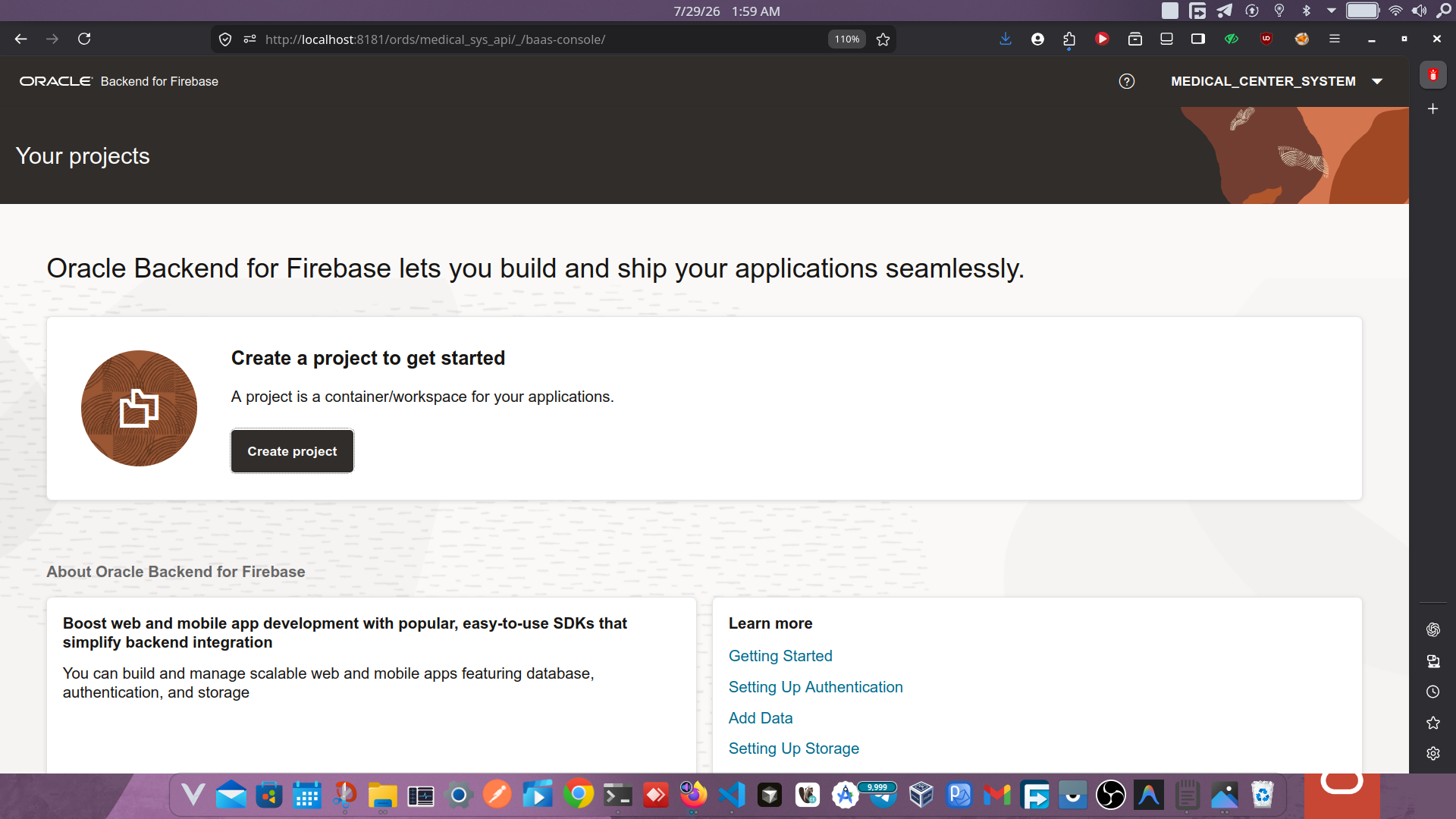
The feature set covers the ground you'd expect from a Firebase-style BaaS:
- Authentication — email/password, social login (Google, Facebook, GitHub), and enterprise identity via Oracle Identity Cloud Service (IDCS), SAML, and OIDC
- Document database — a document-collection model layered on Oracle AI Database, including the ability to map existing relational tables into hierarchical, Firestore-style structures
- File Storage — backed by DBFS or OCI Object Storage
- Security Rules — declarative, evaluated inside the database next to the data they protect
- Vector Search — dense and sparse embeddings, similarity queries, native to the database
- App Trust — an attestation-based layer that rejects backend traffic that doesn't come from a verified app session
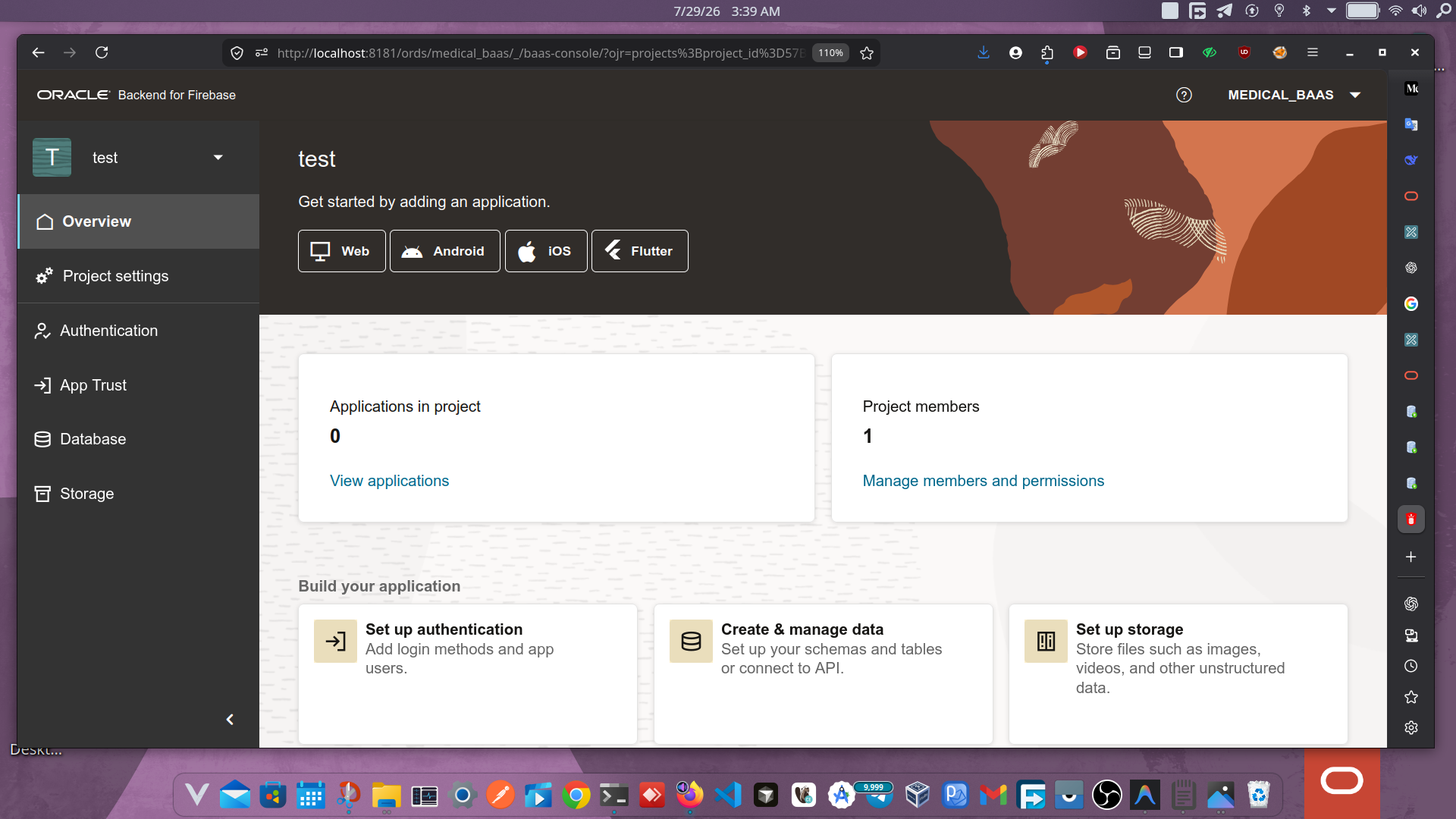
The name is deliberate. Oracle isn't hiding the Firebase resemblance — the SDK interfaces are intentionally designed to mirror Firebase's, specifically so Firebase developers can move across backends with minimal relearning. (Oracle is careful to note this is about API-shape familiarity, not any affiliation with or endorsement by Google — Firebase is a Google trademark, and Fusabase is a distinct, separate Oracle offering.)
The thesis for the rest of this article: Fusabase gives you Firebase's developer ergonomics with Oracle's transactional and analytical depth underneath — at the cost of managing your own database instead of outsourcing that to Google.
Section 2: The Firebase Developer Experience, Reimagined
The single best thing Oracle did with Fusabase was refuse to invent a new mental model. If you know Firebase's SDK shape, you can read Fusabase code on sight.
Initialization
Firebase (JavaScript)
import { initializeApp } from "firebase/app";

const firebaseConfig = {
  apiKey: "AIza...",
  authDomain: "myapp.firebaseapp.com",
  projectId: "myapp",
};

const app = initializeApp(firebaseConfig);
Fusabase (JavaScript)
import { initializeApp } from "fusabase/app";

const app = initializeApp({
  ords_host: "https://your-ords-host/ords/your-schema/",
  schema: "your-schema",
  app_id: "your-app-id",
  project_id: "your-project-id",
  objs_type: "dbfs", // or 'oci' for OCI Object Storage
});
Notice the shape is identical — a single initializeApp() call with a config object — but the config itself reflects what's actually different underneath: instead of a Google-hosted projectId, you're pointing at your own ORDS endpoint and schema.
Authentication
Firebase
import { getAuth, signInWithEmailAndPassword } from "firebase/auth";

const auth = getAuth(app);
signInWithEmailAndPassword(auth, email, password)
  .then((cred) => console.log(cred.user.uid))
  .catch((err) => console.error(err.code));
Fusabase
import { getAuth, signInWithEmailAndPassword } from "fusabase/auth";

const auth = getAuth(app);
signInWithEmailAndPassword(auth, email, password)
  .then((cred) => console.log(cred.user.uid))
  .catch((err) => console.error(err.code));
Same function names, same promise shape, same error-code pattern. The migration cost here, for a typical auth flow, is close to a find-and-replace on the import path.
CRUD Operations
Firebase
import { getFirestore, collection, addDoc, doc, updateDoc } from "firebase/firestore";

const db = getFirestore(app);
const ref = await addDoc(collection(db, "orders"), {
  customerId: "cust_123",
  total: 84.50,
  status: "pending",
});

await updateDoc(doc(db, "orders", ref.id), { status: "shipped" });
Fusabase
import { getOracledb, collection, addDoc, doc, updateDoc } from "fusabase/oracledb";

const db = getOracledb(app);
const ref = await addDoc(collection(db, "orders"), {
  customerId: "cust_123",
  total: 84.50,
  status: "pending",
});

await updateDoc(doc(db, "orders", ref.id), { status: "shipped" });
The only naming difference is getFirestore → getOracledb — a signal that, underneath the document API, you're talking to a real relational engine, not a purpose-built document store.
Real-Time Listeners
Firebase
import { onSnapshot, query, where } from "firebase/firestore";

const q = query(collection(db, "orders"), where("status", "==", "pending"));
onSnapshot(q, (snapshot) => {
  snapshot.docChanges().forEach((change) => {
    console.log(change.type, change.doc.data());
  });
});
Fusabase
import { onSnapshot, query, where } from "fusabase/oracledb";

const q = query(collection(db, "orders"), where("status", "==", "pending"));
onSnapshot(q, (snapshot) => {
  snapshot.docChanges().forEach((change) => {
    console.log(change.type, change.doc.data());
  });
});
Under the hood, Fusabase's real-time layer is backed by Oracle Continuous Query Notification (CQN) — the change feed comes from the database itself, rather than a bolted-on event bus. That's an architectural difference worth remembering even though the API is identical.
Swift (iOS)
import FusabaseCore
import FusabaseAuth
import FusabaseOracledb

// FusabaseApp.configure() reads fusabase-config.json automatically,
// mirroring FirebaseApp.configure() and GoogleService-Info.plist

Auth.auth().signIn(withEmail: email, password: password) { result, error in
    guard let user = result?.user else { return }
    print(user.uid)
}

let db = Oracledb.oracledb()
db.collection("orders").addDocument(data: [
    "customerId": "cust_123",
    "total": 84.50,
    "status": "pending"
])
If you've shipped a Firebase iOS app, this reads like muscle memory.
Section 3: What Makes Fusabase Enterprise-Ready?
This is where the two platforms genuinely diverge — not in API shape, but in what the database underneath is capable of.
ACID Transactions
Firestore gives you transactions, but they operate within Firestore's own document-store semantics and limits (contention windows, document/collection group scoping, retry-on-conflict behavior). Fusabase's document layer sits directly on Oracle AI Database, so a "transaction" is a real Oracle transaction: full ACID guarantees, standard isolation levels, and no separate consistency model to reason about between your document writes and any relational tables you also touch.
import { runTransaction, doc } from "fusabase/oracledb";

await runTransaction(db, async (tx) => {
  const inventoryRef = doc(db, "inventory", "sku_9921");
  const inventorySnap = await tx.get(inventoryRef);

  const currentStock = inventorySnap.data().stock;
  if (currentStock < 1) {
    throw new Error("Out of stock");
  }

  tx.update(inventoryRef, { stock: currentStock - 1 });
  tx.set(doc(collection(db, "orders")), {
    sku: "sku_9921",
    customerId: "cust_123",
    status: "confirmed",
  });
});
If the order write fails, the stock decrement rolls back — no eventual-consistency window where a customer's order confirms against inventory that was already sold to someone else.
Complex Queries: Joins and Aggregations
Firestore intentionally doesn't do joins; you either denormalize data or fan out multiple round trips in application code. Because Fusabase document collections can be layered over real relational tables, you can query across related collections in ways Firestore structurally can't.
import { collectionGroup, query, where, getDocs } from "fusabase/oracledb";

// Collection group query across all "reviews" subcollections
const q = query(
  collectionGroup(db, "reviews"),
  where("rating", ">=", 4)
);
const snap = await getDocs(q);
For genuine relational joins and aggregates — "total revenue per customer across all orders, joined with support ticket counts" — Fusabase lets you drop down to SQL against the same schema your documents live in, via ORDS-exposed endpoints or direct database access, rather than forcing that logic into the client.
Duality Views: The Feature With No Firebase Equivalent
This is Fusabase's signature architectural trick. Oracle AI Database supports JSON-Relational Duality Views — the same underlying rows can be exposed simultaneously as normalized relational tables and as JSON documents, with no duplicated storage and no ETL between the two shapes.
Practically: your finance team can run standard SQL reports against a normalized orders / order_items / customers schema, while your mobile app reads and writes the exact same data as nested JSON documents through the Fusabase SDK — and a write from either side is immediately visible to the other, because there's only one copy of the data.
Duality views also carry their own security model. You can define multiple duality views over the same base tables that expose different fields or allow different updates — a "student view" that can edit a display name but not a grade, and a "teacher view" with the reverse permissions — enforced by the database itself through grants and roles, not by application code.
Vector Search
Vector Search runs natively in Oracle AI Database rather than through a bolted-on companion service. You store dense or sparse embeddings directly on your documents and query by similarity:
import { collection, vectorQuery, getDocs } from "fusabase/oracledb";

const results = await getDocs(
  vectorQuery(collection(db, "support_tickets"), {
    vectorField: "embedding",
    queryVector: embedding, // e.g. from an embedding model call
    topK: 5,
    metric: "cosine",
  })
);
Because the vectors live next to your relational/JSON data in the same database, you can combine a similarity search with a normal where() filter (e.g., "semantically similar tickets, but only ones still open") in a single query, instead of stitching together results from a separate vector database.
App Trust
App Trust is an attestation layer that attaches a provider-issued token to Fusabase API calls, so the backend can reject traffic that isn't coming from a verified app session — think reCAPTCHA v3/Enterprise, hCaptcha, or Cloudflare Turnstile, wired directly into the request path. Two direct, practical benefits: a cloned sign-in page can't talk to your real backend with harvested credentials, and expensive operations (heavy queries, large reads, vector searches) only spend database compute for traffic that passes attestation — a scraper running off a stolen client config doesn't get to run up your bill.
Performance: What We Can and Can't Tell You Honestly
You'll see "10,000 concurrent users, 1M documents, Fusabase vs. Firebase" requested in a lot of BaaS comparison content — including, frankly, in the brief for this article. We're not going to hand you fabricated benchmark numbers dressed up as real ones. As of this writing, Oracle hasn't published an independent, reproducible Fusabase-vs-Firestore load test, and because Fusabase is self-managed, its performance characteristics depend heavily on how you size the underlying Oracle Database and ORDS deployment — a detail Firestore's fully-managed model abstracts away entirely.
What we can tell you architecturally:
| Dimension | Firestore | Fusabase (Oracle AI Database) |
|---|---|---|
| Scaling model | Automatic, managed by Google | Manual/managed by you (or via OCI Autonomous Database autoscaling) |
| Consistency under load | Eventual consistency for most reads | Full ACID, configurable isolation levels |
| Cross-entity query cost | Multiple round trips or denormalization | Single query via joins/duality views |
| Cold-start / ops overhead | None — fully managed | You own capacity planning, patching, HA |
If a real benchmark matters for your decision, it's worth running it yourself against your own workload shape — Oracle's LiveLab workshop (linked below) is a reasonable place to build the test harness, since query performance here is genuinely dependent on your indexing and instance sizing, not a fixed number either vendor can honestly hand you.
Section 4: Real-World Use Cases
E-Commerce Platform. Inventory management is the textbook case for ACID transactions — you cannot afford a decrement-then-crash gap between "stock reduced" and "order confirmed." Pair that with a real-time product catalog via onSnapshot, and duality views let your warehouse system consume the same inventory table your storefront reads as documents.
Healthcare App. Patient records demand strict transactional integrity and auditability that a document-only store struggles to provide natively (Oracle's TDE, VPD, and auditing apply to Fusabase collections automatically, since they're real database objects). Vector search on top of the same records enables semantic search over clinical notes without exporting PHI to a third-party vector service.
Live Auction System. Real-time bidding needs both low-latency updates (via CQN-backed listeners) and transactional guarantees on the final bid-to-payment handoff — exactly the combination Firestore's eventual consistency makes awkward and Fusabase's ACID transactions make straightforward.
IoT Data Pipeline. High-ingestion telemetry lands in document collections for application-facing access, while the same underlying tables support the complex aggregation queries (rollups, time-window joins) that a pure document store would push back into application code.
Section 5: Getting Started
Automated Installer Available
Want to skip the manual setup? Use the Oracle Backend for Firebase Installer script to provision and configure the database and ORDS automatically.
Prerequisites
- An Oracle Database instance (Oracle AI Database, Autonomous Database, or a self-managed instance) with ORDS 26.1.1 configured
- Node.js 18+ and npm (for the JS SDK), or Xcode/CocoaPods/SPM for iOS
- DBA-level access to enable a schema for Fusabase
Step 1: Enable a Project Schema
CREATE TABLESPACE fusabase_tbs
  DATAFILE 'fusabase_tbs01.dbf' SIZE 50M AUTOEXTEND ON
  EXTENT MANAGEMENT LOCAL SEGMENT SPACE MANAGEMENT AUTO;

CREATE USER fusabase_user IDENTIFIED BY "your_secure_password"
  DEFAULT TABLESPACE fusabase_tbs QUOTA UNLIMITED ON fusabase_tbs;

GRANT CREATE SESSION TO fusabase_user;
GRANT RESOURCE TO fusabase_user;BEGIN
OBAAS_ADMIN.OBAAS_ENABLE_SCHEMA('FUSABASE_USER', 'BASE_PATH', 'fusabase_user', FALSE);
END;
/
COMMIT;Step 2: Open the Console and Create a Project
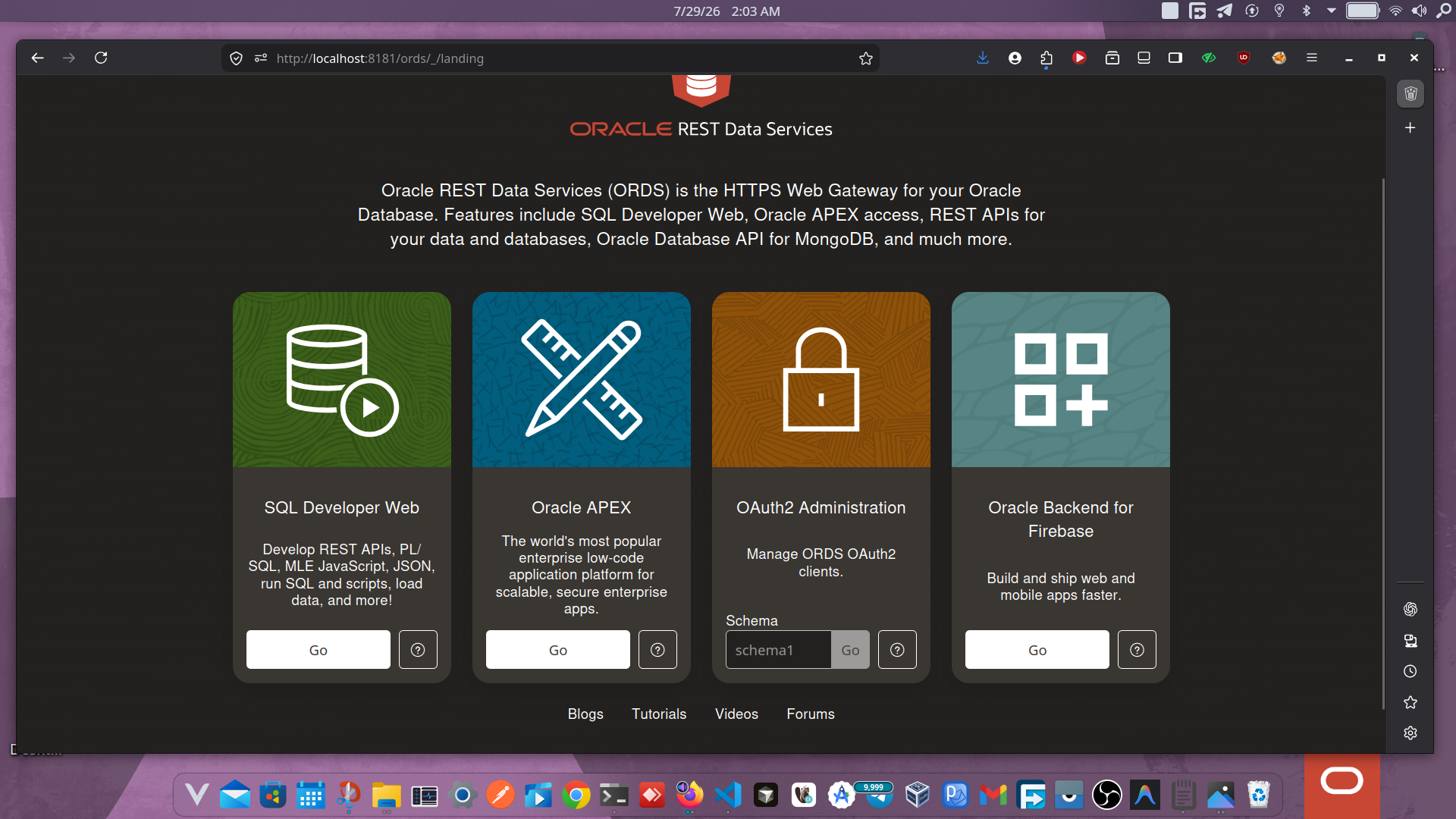
Navigate to http://localhost:8080/ords/_/landing, open the Oracle Backend for Firebase tile, sign in with your schema credentials, and choose Create Project.
Step 3: Install the SDK
npm install fusabaseStep 4: Initialize and Authenticate
import { initializeApp } from "fusabase/app";
import { getAuth, createUserWithEmailAndPassword } from "fusabase/auth";

const app = initializeApp({ /* config from Console */ });
const auth = getAuth(app);

await createUserWithEmailAndPassword(auth, "dev@example.com", "SecurePass123!");
Step 5: Create a Collection and Documents
import { getOracledb, collection, addDoc } from "fusabase/oracledb";

const db = getOracledb(app);
await addDoc(collection(db, "todos"), {
  text: "Ship the Fusabase migration guide",
  done: false,
  ownerId: auth.currentUser.uid,
});
Step 6: Query, Order, and Paginate
import { collection, query, where, orderBy, limit, getDocs } from "fusabase/oracledb";

const q = query(
  collection(db, "todos"),
  where("ownerId", "==", auth.currentUser.uid),
  where("done", "==", false),
  orderBy("createdAt", "desc"),
  limit(20)
);
const snapshot = await getDocs(q);
Step 7: Set Up Security Rules
Security rules are declarative and enforced inside the database, alongside your collections, documents, and storage paths:
match /todos/{todoId} {
  allow read, update, delete: if request.auth.uid == resource.data.ownerId;
  allow create: if request.auth.uid != null;
}
Step 8: Deploy
Wire the pieces above into a small React or SwiftUI front end, point it at your ORDS host, and you have a working, authenticated Todo app running on Oracle AI Database — using an SDK that reads like Firebase's.
Section 6: The Challenges (Honest Assessment)
Learning curve. The document API will feel instantly familiar. The parts that don't — duality views, understanding how security rules interact with underlying grants and roles, reasoning about relational schema design instead of just nesting JSON — require a genuine mental shift from "NoSQL document thinking" to "relational-plus-document thinking." That's a real cost, not a footnote.
Operational model, not pricing tiers. This is the biggest practical difference and it's more fundamental than "different pricing." Firebase is fully managed: Google runs Firestore, you pay per read/write/storage on the Blaze plan, and you never touch infrastructure. Fusabase is self-managed — you provision and operate the Oracle Database and ORDS yourself, on OCI, another cloud, or on-prem. Your cost is Oracle Database licensing/Autonomous Database consumption plus whatever infrastructure you run it on, not a per-document-read meter. That's a better fit if you already run Oracle and want predictable, capacity-based costs — and a worse fit if you wanted zero ops overhead, which is a large part of what makes Firebase attractive in the first place.
Ecosystem maturity. Firebase has over a decade of Stack Overflow answers, tutorials, and third-party libraries. Fusabase's SDKs are open source on GitHub (oracle/fusabase-js-sdk, oracle/fusabase-ios-sdk, and Android/Flutter equivalents) but young — expect to read source and official docs more often than you'd like, and expect gaps a mature ecosystem would have already filled.
Vendor lock-in — the honest version. Oracle's answer is that the SDKs are open source and dual-licensed (UPL 1.0 / Apache 2.0), and that the API surface deliberately mirrors Firebase's, which arguably makes migrating away easier than Firestore's proprietary query semantics do. But you are still building on Oracle Database specifically — duality views, App Trust, and the document layer are Oracle-specific mechanisms. "Less locked in than Firestore" is a fair claim; "not locked in" is not.
Section 7: Fusabase vs. Firebase vs. Supabase
| Capability | Firebase | Fusabase (Oracle Backend for Firebase) | Supabase |
|---|---|---|---|
| Core database model | Document (Firestore) | Document + relational, unified via duality views | Relational (Postgres) with a REST/GraphQL layer |
| ACID transactions | Firestore-scoped transactions | Full database ACID | Full Postgres ACID |
| Joins / relational queries | Not supported natively (denormalize or client-side fan-out) | Native SQL joins + duality views over document API | Native SQL joins |
| Aggregation queries | Limited (count, sum, avg on collections) | Full SQL aggregation | Full SQL aggregation |
| Native vector search | Via separate Vertex AI integration | Native in-database vector search | pgvector extension |
| Real-time updates | Native (onSnapshot) | Native (onSnapshot, backed by Oracle CQN) | Native (Realtime, via Postgres replication) |
| Authentication | Built-in, broad provider support | Built-in — email/password, social, IDCS/SAML/OIDC | Built-in — email/password, social, SSO |
| File storage | Cloud Storage | DBFS or OCI Object Storage | S3-compatible storage |
| Security model | Firestore Security Rules | Declarative rules enforced in-database + duality-view grants | Postgres Row Level Security |
| Attestation / bot protection | App Check | App Trust (reCAPTCHA/hCaptcha/Turnstile-backed) | Not built-in |
| Hosting model | Fully managed (Google) | Self-managed (your infrastructure) | Managed (Supabase Cloud) or self-hosted |
| Pricing model | Usage-metered (Blaze) | Infrastructure/license cost, not per-op metering | Flat subscription tiers + usage add-ons |
| Ecosystem/community size | Very large, mature | New, growing | Large, mature |
| Enterprise support | Google Cloud support plans | Oracle enterprise support | Supabase Enterprise plans |
The honest read: Supabase already solved "give me a relational database with a friendly API" for teams that don't need Oracle specifically. Fusabase's differentiator isn't "relational instead of document" in the abstract — it's Oracle AI Database's specific capabilities (duality views, in-database vector search, VPD/TDE/auditing inherited for free) combined with a client SDK that a Firebase team can pick up in an afternoon.
Conclusion: The Verdict
Fusabase is not a Firebase killer, and Oracle isn't pitching it as one. It's a bridge for a specific, recurring failure mode: teams that started on Firebase because it was fast, and hit a ceiling — ACID guarantees, real joins, in-database vector search, or compliance requirements — that Firestore's document model wasn't built to clear.
If you're happy on Firebase and haven't hit that ceiling, there's no reason to move. If you're an Oracle shop already, or you're staring down a checkout flow, patient record system, or auction platform that needs transactional guarantees Firestore can't give you, Fusabase is worth a serious look — precisely because the SDK migration cost is unusually low for how much it changes underneath.
The future of BaaS increasingly looks hybrid: consumer-grade developer ergonomics on top of enterprise-grade data engines. Fusabase is a genuine, if early, entry in that direction.
Try it yourself: Oracle publishes a hands-on LiveLab workshop (build a "RecipeShare" app, available for web, iOS, and Android) covering SDK installation, the Console, Authentication, Security Rules, Database, and Storage end to end. The SDKs themselves are open source on GitHub under oracle/fusabase-js-sdk, oracle/fusabase-ios-sdk, and the corresponding Android and Flutter repositories.
References
- Oracle, Introducing Oracle Backend for Firebase: Build Mobile and Web Apps on Oracle AI Database — blogs.oracle.com/database
- Oracle, Oracle Backend for Firebase Developer's Guide, Release 26.1 — docs.oracle.com/en/database/oracle/backend-for-firebase
- Oracle, Oracle Backend for Firebase product page — oracle.com/database/technologies/appdev/oracle-backend-for-firebase
- Oracle, Duality-View Security: Simple, Centralized, Use-Case-Specific — docs.oracle.com/en/database/oracle/oracle-database/26/jsnvu
- GitHub:
oracle/fusabase-js-sdk,oracle/fusabase-ios-sdk, and Flutter SDK on pub.dev - Automated Setup: Oracle Backend for Firebase Installer (GitHub)
Note: "Firebase" is a trademark of Google LLC. Its use in this article, and in Oracle's own documentation, describes API-shape similarity for developer familiarity only and implies no affiliation with or endorsement by Google.